How to style a Hugo Atom feed with XSL
 Andre Franca
4 min read
Andre Franca
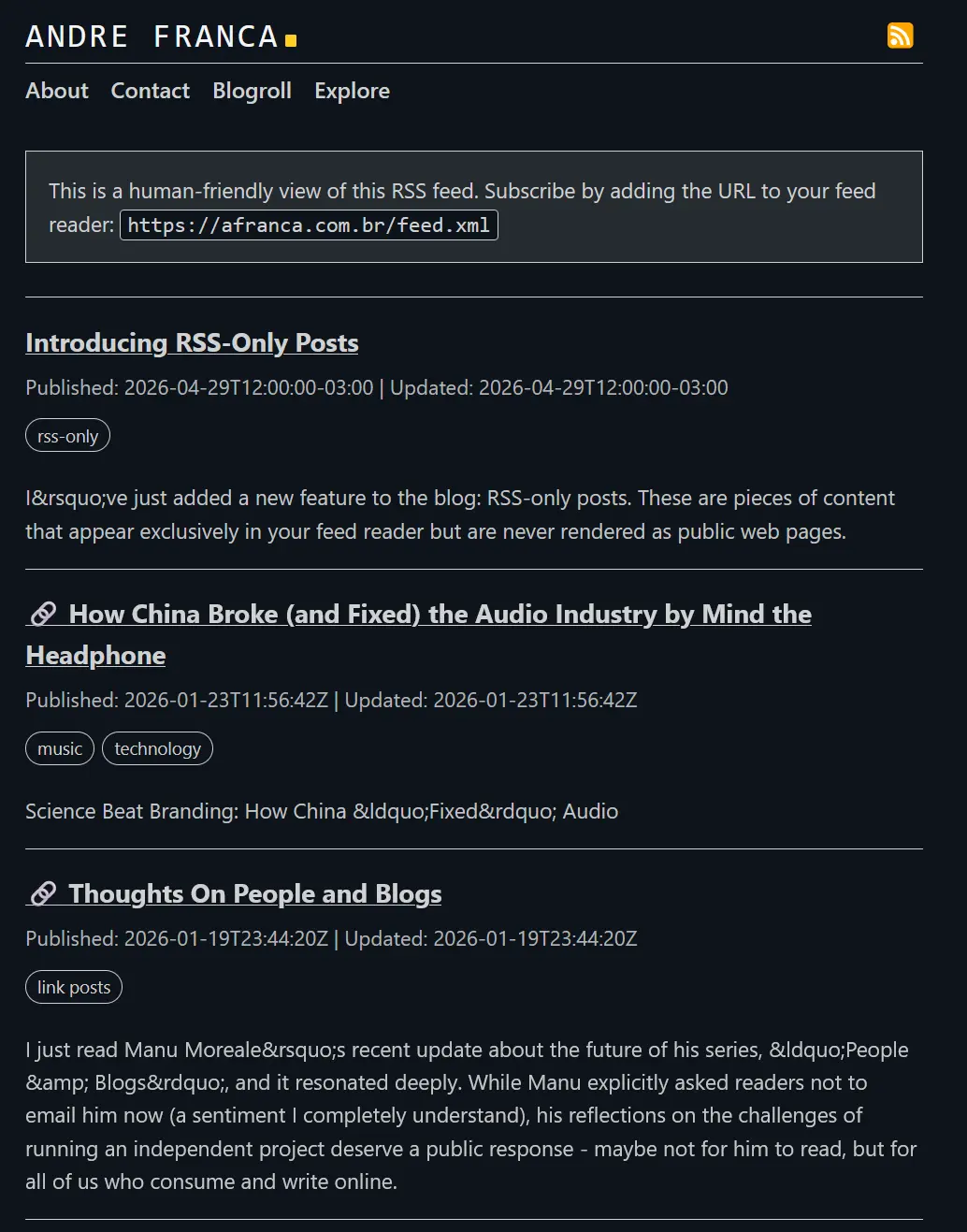
4 min readIf you open my rss feed url in your browser, you’ll won’t see raw XML content anymore, but a styled HTML page with the same header and footer as the main site, and a list of recent posts in between. This won’t affect feed readers, which will still see the original XML content. The styling is applied only when a human visits the feed URL in a browser, to make it more readable.
I’ve achieved something similiar years ago with Jekyll, but never really got around to doing it in Hugo until recently.
The idea is simple:
- Generate an Atom feed in Hugo1.
- Add
xml-stylesheetto the XML. - Create XSL files in
static/xsl/for a human-friendly browser view. - Apply the same approach to sitemaps.
Why Atom instead of Hugo’s native RSS?
In this project I use Atom, not Hugo’s default RSS, for one practical reason: Atom supports an explicit updated field per entry.
That lets feeds expose both publish and update timestamps (published and updated), which is useful for edited posts.
1. Disable default RSS and configure Atom output [optional if you want to keep the RSS format]
- Define explicit outputs and do not include
rss. - Add a custom Atom output format with
baseName = "feed"2.
In hugo.toml:
[outputs]
  home = ['html', 'atom', 'sitemap', 'postssitemap', 'pagessitemap', 'tagssitemap']
  term = ['html'] # [optional] include 'atom' for tags/categories if you want

[outputFormats]
  [outputFormats.atom]
    mediatype = "application/atom+xml"
    baseName = "feed"

[mediaTypes]
  [mediaTypes."application/atom+xml"]
    suffixes = ["xml"]
With this, Hugo generates /feed.xml as the canonical feed endpoint (instead of the default RSS endpoint behavior).
2. Create Atom templates
Use:
layouts/index.atom.xmlfor the home feed- [optional]
layouts/_default/list.atom.xmlfor list/term feeds (for example, tags)
Important header snippet for both:
{{- printf "<?xml version=\"1.0\" encoding=\"utf-8\"?>\n" | safeHTML -}}
{{- printf "<?xml-stylesheet type=\"text/xsl\" href=\"%s\"?>\n" ("/xsl/atom.xsl" | absURL) | safeHTML -}}
<feed xmlns="http://www.w3.org/2005/Atom" xml:lang="{{ site.Language.LanguageCode }}">
That xml-stylesheet instruction tells the browser to apply the XSL.
See full atom template structure in my repo.
3. Create the feed XSL (static/xsl/atom.xsl)
Current implementation:
<?xml version="1.0" encoding="UTF-8"?>
<xsl:stylesheet version="1.0"
  xmlns:xsl="http://www.w3.org/1999/XSL/Transform"
  xmlns:atom="http://www.w3.org/2005/Atom"
  exclude-result-prefixes="atom">

  <xsl:output method="html" encoding="UTF-8" indent="yes"/>

  <xsl:template match="/">
    <html lang="en">
      <head>
        <meta charset="utf-8"/>
        <meta name="viewport" content="width=device-width, initial-scale=1"/>
        <title>
          <xsl:text>Feed: </xsl:text>
          <xsl:value-of select="atom:feed/atom:title"/>
        </title>
        <!-- CSS trimmed for brevity -->
      </head>
      <body>
        <!-- Same header structure as the website -->
        <!-- site title + main menu -->

        <!-- Feed entries -->

        <xsl:for-each select="atom:feed/atom:entry">
          <article>
            <h2>
              <a href="{atom:link[@rel='alternate']/@href}">
                <xsl:value-of select="atom:title"/>
              </a>
            </h2>
            <p>
              <xsl:text>Published: </xsl:text><xsl:value-of select="atom:published"/>
              <xsl:text> | Updated: </xsl:text><xsl:value-of select="atom:updated"/>
            </p>
            <xsl:if test="normalize-space(atom:summary) != ''">
              <p><xsl:value-of select="atom:summary"/></p>
            </xsl:if>
          </article>
        </xsl:for-each>

        <!-- Same footer structure as the website -->
        <!-- site name + footer nav + badges -->
      </body>
    </html>
  </xsl:template>
</xsl:stylesheet>
See the full XSL template in my repo.
In this version, the feed XSL now mirrors site header/footer content (title, menus, and badges) instead of using a simplified custom top/bottom layout.
4. Style sitemaps with the same approach (static/xsl/sitemap.xsl)
In your sitemap template, add:
{{ printf "<?xml version=\"1.0\" encoding=\"utf-8\"?>" | safeHTML }}
{{ printf "<?xml-stylesheet type=\"text/xsl\" href=\"%s\"?>" ("/xsl/sitemap.xsl" | absURL) | safeHTML }}
I’ve split my sitemaps into multiple files (home, posts, pages, and tags) for better organization, but you can also keep a single sitemap if you prefer. Just make sure to include the xml-stylesheet instruction in each sitemap template and disableKinds = ["sitemap"] to your hugo config to prevent Hugo from generating the default sitemap.xml, which would not have the XSL instruction.
See my sitemap templates structure in my repo:
For home sitemap, posts sitemap, pages sitemap, and tags sitemap.
Then create static/xsl/sitemap.xsl to render:
sitemapindexas a list of sitemap filesurlsetas a URL table- the same site-level header/footer structure used in the Atom XSL
See the full sitemap XSL template in my repo.
5. Common issues
404 on old feed path (
/index.xml): if you changed hugo’s defaultbaseName = "feed"as I did above, the correct endpoint is/feed.xml.XSL not applied in browser: verify
hrefinxml-stylesheetand confirm the file exists instatic/xsl.Broken content in feed: usually caused by double-escaping in
content.Header/footer drift from site template: if your site header/footer changes later, update both XSL files to keep visual parity. I haven’t managed to make the site’s header and footer templates reusable in XSL, but if you have a way to do that, please let me know!
With this setup, your feed and sitemap outputs remain standards-compliant for machines while also becoming human-readable in browsers, with a visual experience aligned to the main site template.
This is the end result when you open the feed URL in a browser:
Hugo’s default RSS uses the rss standard. By defining a custom Atom output format and templates, we can leverage the richer metadata that Atom provides. ↩︎
The
baseNamedetermines the filename of the generated feed. Setting it to “feed” means the output will befeed.xmlinstead of the defaultindex.xml. ↩︎